Lab 8: Projection Shadows and Render Pipeline
Expected due date: 02-11-2022
Learning Objectives: The purpose of this set of
exercises is to produce simple shadows using projection matrices. As a
side product, the aim is to get a better understanding of the
rasterization pipeline. We are only concerned with generating the
shadows – this means that using Phong lighting is an optional extension.
Tasks:
Part 1: Scene
The purpose of this part of the laboratory is to setup the scene in
where we implement a set of projected shadows. To show the shadows
working we will setup the scene with two objects (squares) and a plane
(the ground) where the object's shadows will be projected unto. This
plane is a repeat of Lab 6 so the initialization and preparation for
that is the exact same in this lab, just with a texture provided instead
of the black and white divisions. As for the square they are implemented
using a red color texture implemented by the code shown below:
var texture = gl.createTexture();
gl.activeTexture(gl.TEXTURE1);
gl.bindTexture(gl.TEXTURE_2D, texture);
gl.texImage2D(gl.TEXTURE_2D, 0, gl.RGB, 1, 1, 0, gl.RGB, gl.UNSIGNED_BYTE, new Uint8Array([255, 0, 0]));
gl.texParameteri(gl.TEXTURE_2D, gl.TEXTURE_MIN_FILTER, gl.NEAREST);
gl.texParameteri(gl.TEXTURE_2D, gl.TEXTURE_MAG_FILTER, gl.NEAREST);
gl.texParameteri(gl.TEXTURE_2D, gl.TEXTURE_WRAP_S, gl.CLAMP_TO_EDGE);
gl.texParameteri(gl.TEXTURE_2D, gl.TEXTURE_WRAP_T, gl.CLAMP_TO_EDGE);
From the code above we can see that the texture is initialized as a 1 x
1 wide texture, with the RGB value of; 255,0,0. Which corresponds to
red. The texImage2D parameters are:
-
Target: The GL variable that specifies the texture
binding point.
-
Level: The level of detail based on mipmap
reduction levels, 0 being source.
-
Internal Format: The GL variable specifying the
color component of the texture.
- Width: The width of the texture.
- Height: The height of the texture.
- Border: The border width of the texture.
-
Format: The GL variable specifying the format of
the texel data.
-
Type: The GL variable specifying the data type.
-
Source: The html image element containing the
texture image.
In order to get the positioning of the squares we follow the lab
specifications and place the vertices on the vBuffer at the
vertices shown below:
const vertices = [
    // Large textured plane (ground)
        vec3(-2, -1, -1),
        vec3(-2, -1, -5),
        vec3(2, -1, -5),
        vec3(2, -1, -1),
    // Small square on the left of the screen
        vec3(0.25, -0.5, -1.75),
        vec3(0.25, -0.5, -1.25),
        vec3(0.75, -0.5, -1.25),
        vec3(0.75, -0.5, -1.75),
    // Square laying flat on the texture
        vec3(-1, -1, -3),
        vec3(-1, -1, -2.5),
        vec3(-1, 0, -2.5),
        vec3(-1, 0, -3)
    ];
Result
Part 2: Projection Shadows
Now that the scene has been setup we can use the position of the two red
squares to darken the texture color of the ground giving an illusion of
shadow casted by a light source. First thing to do is to create the
light source which as specified by the lab instructions is a sphere
point light source of with circle center (0, 2, −2) and radius 2. Using
this light source we can now create a
shadowProjectionMatrix as shown in the code below:
var lightPosition = vec3(0.0, 2.0, -2.0); // The 4th element indicates: 1.0 = directional light, 0.0 = point light
var lightRadius = 2.0;

var groundY = -1.0; // The y value of the ground

var groundProjection = 1.0 / -(lightPosition[1] - groundY); // The projection of the light unto the ground

var shadowProjectionMatrix = mat4(
    1.0, 0.0, 0.0, 0.0,
    0.0, 1.0, 0.0, 0.0,
    0.0, 0.0, 1.0, 0.0,
    0.0, groundProjection, 0.0, 0.0);
Using the data for the shadow projection and the light position we can
now calculate the location of the shadows by manipulating the model of
the red squares and redraw the squares at the new position. This will
render two versions of the squares and give the illusion that one of
them are the shadows. The rendering method is shown below:
gl.clear(gl.COLOR_BUFFER_BIT | gl.DEPTH_BUFFER_BIT);

// Orbiting Light source
theta += 0.01;
if (theta > 2 * Math.PI) {
    theta -= 2 * Math.PI;
}

lightPosition[0] = lightRadius * Math.sin(theta);
lightPosition[2] = lightRadius * Math.cos(theta);

// Create the MVP matrices
var modelMatrix = mat4(); // The model matrix is empty because the model doesn't move
var viewMatrix = lookAt(eye, at, up);
var projectionMatrix = perspective(fovY, aspect, near, far);

// Send the matrices to the shaders
gl.uniformMatrix4fv(uniformLocations.projectionMatrix, false, flatten(projectionMatrix));
gl.uniformMatrix4fv(uniformLocations.mvMatrix, false, flatten(mult(viewMatrix, modelMatrix)));

gl.uniform1i(uniformLocations.texture, 0);

// Draw the ground
gl.drawElements(gl.TRIANGLES, 6, gl.UNSIGNED_BYTE, 0);

// Change the model position of the shadow squares
var shadowModelMatrix = mult(translate(lightPosition[0], lightPosition[1], lightPosition[2]), shadowProjectionMatrix);
shadowModelMatrix = mult(shadowModelMatrix, translate(-lightPosition[0], -lightPosition[1], -lightPosition[2]));

gl.uniformMatrix4fv(uniformLocations.mvMatrix, false, flatten(mult(viewMatrix, shadowModelMatrix)));
gl.uniform1i(uniformLocations.texture, 1);

// Draw the shadow squares
gl.drawElements(gl.TRIANGLES, 12, gl.UNSIGNED_BYTE, 6);

// Update the matrices
gl.uniformMatrix4fv(uniformLocations.mvMatrix, false, flatten(mult(viewMatrix, modelMatrix)));
gl.uniform1i(uniformLocations.texture, 1);

gl.drawElements(gl.TRIANGLES, 12, gl.UNSIGNED_BYTE, 6);

window.requestAnimationFrame(render);
Result
Part 3: Shadow Polygon Culling
One problem with shadow squares is that they are drawn even if there is
no ground and protrude of the edge. To fix this we need to use a depth
test function that accepts fragments with greater depth values to draw
shadow polygons only if there is also a ground polygon. We also need to
handle z-fighting using an offset in the projection matrix so that the
depth filter doesn't hide the objects behind the shadows. First lets
add a depth test function with levels of depth to our draw function by
adding the use of the GL depthFunc method. This method sets
the level of importance between the incoming and the current pixel depth
values once the depth test is enabled. So we need to make sure the when
the shadows are drawn their pixel depth values are given less importance
than the already drawn ground, and the red squares are given the highest
importance as shown in the code below:
gl.enable(gl.DEPTH_TEST);

render()
function render(){
    gl.clear(gl.COLOR_BUFFER_BIT | gl.DEPTH_BUFFER_BIT);
    // Orbiting Light source
    theta += 0.01;
    if (theta > 2 * Math.PI) {
        theta -= 2 * Math.PI;
    }

    lightPosition[0] = lightRadius * Math.sin(theta);
    lightPosition[2] = lightRadius * Math.cos(theta);

    // Create the MVP matrices
    var modelMatrix = mat4(); // The model matrix is empty because the model doesn't move
    var viewMatrix = lookAt(eye, at, up);
    var projectionMatrix = perspective(fovY, aspect, near, far);

    // Send the matrices to the shaders
    gl.uniformMatrix4fv(uniformLocations.projectionMatrix, false, flatten(projectionMatrix));
    gl.uniformMatrix4fv(uniformLocations.mvMatrix, false, flatten(mult(viewMatrix, modelMatrix)));

    gl.uniform1i(uniformLocations.texture, 0);

    gl.uniform4fv(uniformLocations.visibility, Colors.White);

    // Draw the ground
    gl.drawElements(gl.TRIANGLES, 6, gl.UNSIGNED_BYTE, 0);

    // Change the model position of the shadow squares
    var shadowModelMatrix = mult(translate(lightPosition[0], lightPosition[1], lightPosition[2]), shadowProjectionMatrix);
        shadowModelMatrix = mult(shadowModelMatrix, translate(-lightPosition[0], -lightPosition[1], -lightPosition[2]));

    gl.uniformMatrix4fv(uniformLocations.mvMatrix, false, flatten(mult(viewMatrix, shadowModelMatrix)));
    gl.uniform1i(uniformLocations.texture, 1);
    gl.depthFunc(gl.GREATER);
    gl.uniform4fv(uniformLocations.visibility, Colors.Black);

    // Draw the shadow squares
    gl.drawElements(gl.TRIANGLES, 12, gl.UNSIGNED_BYTE, 6);

    // Update the matrices
    gl.uniformMatrix4fv(uniformLocations.mvMatrix, false, flatten(mult(viewMatrix, modelMatrix)));
    gl.uniform1i(uniformLocations.texture, 1);

    gl.depthFunc(gl.LESS);
    gl.uniform4fv(uniformLocations.visibility, Colors.White);

    gl.drawElements(gl.TRIANGLES, 12, gl.UNSIGNED_BYTE, 6);

    window.requestAnimationFrame(render);
}
From the updated render method shown above we can also see how there is
also a new uniform variable visibility that is being sent
to the fragment shader. This variable will determine the color of the
fragment being rendered by multiplying the fragment by that color. In
the case of it being multiplied by white then the normal fragment color
will be chosen since $1 \times 1 = 1$ even in vector mathematics. We now
have one last task in this part of the lab. Currently we are
experiencing z-fighting in our application between the ground and the
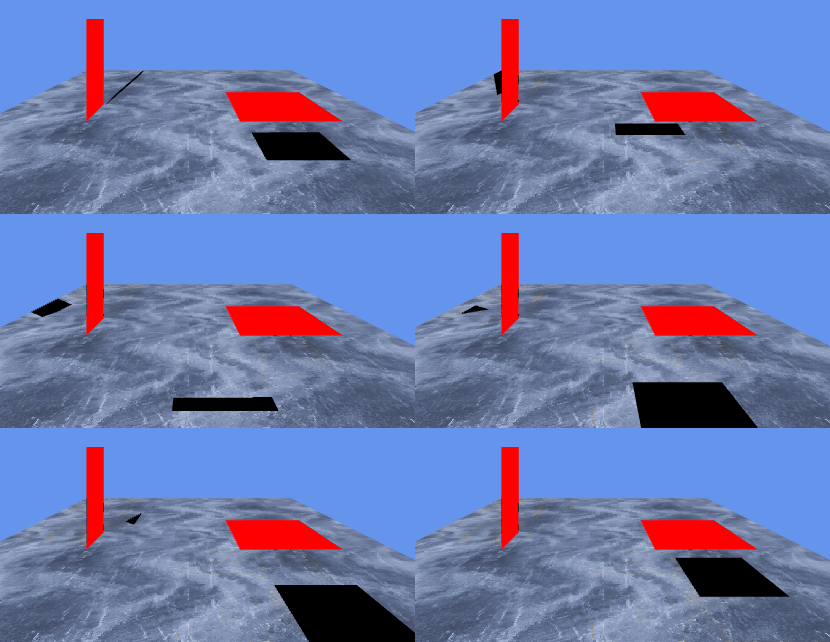
shadows because they are both on the same z-value. The z-fighting leads
to the shadows flickering as shown in the image below:
To fix this we have to implement a z offset to the shadows we do this by
translating the shadows farther up in the z-axis. Which can be done by
the following code in our initialization of the
shadowModelMatrix :
var zoffset = -0.00001;
shadowModelMatrix = translate(0, zoffset, 0);
Result
Part 4: Ambient Light in Shadows
The pitch black shadows are unrealistic and should not be considered an
accurate model representation. To make the shadows look better we
require the color black to blend into the texture color making them look
more as a part of the ground. This essentially will make the texture of
the shadow a transparent value. We however, cannot simply pass a
transparent color vector as WebGL will not blend the next color. We
simply need to enable WebGL to blend the colors by using the following
code in our
init method:
gl.enable(gl.BLEND);
gl.blendFunc(gl.SRC_ALPHA, gl.ONE_MINUS_SRC_ALPHA);
Result
Part 5: Optional Lighting
This part is about implementing the Phong Reflection Model and will be
completed at a later time due to time constraints.